





Why Cable Organization Matters
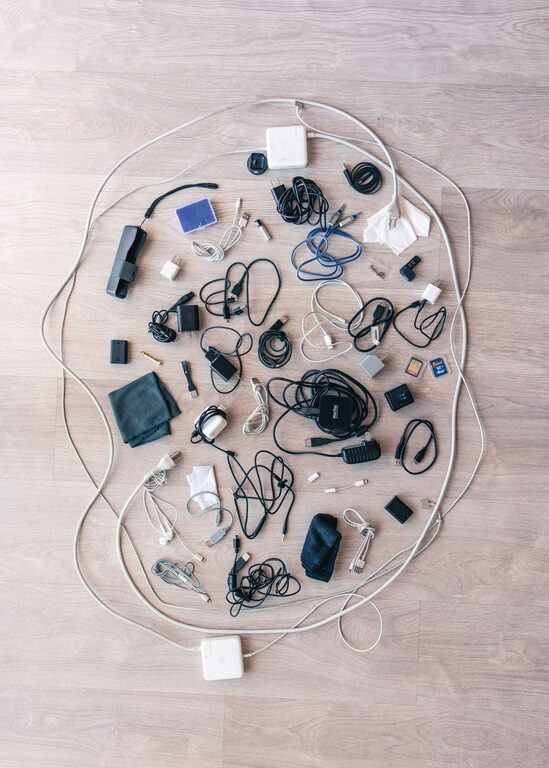
Cables and chargers have a way of collecting quickly. A phone charger may end up beside the sofa, a laptop cable may disappear into a drawer, and several nearly identical USB cables may become tangled together. Without a simple system, finding the right cable can take longer than using it.
Organizing cables is not only about making a space look neat. It also helps protect cords from bending, reduces clutter, and makes it easier to see which chargers you already own. The best system is one that is simple enough to maintain every day.
Start by Gathering and Sorting Everything
Before buying storage products, collect all of your cables and chargers in one place. Check desks, drawers, bags, shelves, bedside tables, and other areas where cords may be hiding.
Spread everything out and sort the items into groups such as:
- Phone and tablet charging cables
- Laptop and computer power cords
- Audio and video cables
- Camera and gaming accessories
- Extension cords and power strips
- Adapters, plugs, and other accessories
As you sort, separate cables that are damaged, frayed, stretched, or no longer useful. Set aside duplicates so you can decide whether you truly need them. Avoid keeping a large collection of mystery cables “just in case.” If you do not know what a cable is for and cannot identify it after a quick check, it may be ready to leave your collection.
Choose a Storage Location
A dedicated storage location prevents cables from spreading throughout the home. Choose a place that is convenient but not in the way. A desk drawer, cabinet, shelf, or small storage box can work well.
Consider creating two areas:
- Daily-use station: Chargers and cables used regularly stay close to your desk, bedside table, or main seating area.
- Backup storage: Spare cables, adapters, and less frequently used accessories go in a labeled box or drawer.
Keeping everyday items separate from backups makes it faster to find what you need. It also prevents a crowded drawer from becoming the default storage location for every cord in the house.
Use the Right Storage Tools
You do not need expensive organizers to create a neat setup. Use tools that match the number and type of cables you have.
Cable ties and reusable straps
Reusable hook and loop straps are useful for bundling cords without making them difficult to open. They are usually gentler and more convenient than disposable ties. Choose a strap size that holds the cable securely without squeezing it tightly.
Small boxes and pouches
Small boxes can separate different cable categories inside a larger drawer. Pouches are especially useful for travel kits or cables that you carry in a backpack. Use one pouch for charging accessories and another for computer or audio cables.
Drawer dividers
Dividers keep cables in separate sections and prevent them from sliding into one tangled pile. Adjustable dividers are useful if your collection changes often.
Clips and cable holders
Adhesive clips or weighted cable holders can keep frequently used cords in place on a desk or nightstand. Position them near the edge of the surface so the cable ends are easy to reach but do not fall behind the furniture.
Coil Cables Without Damaging Them
The way you wrap a cable affects how long it lasts. Avoid bending cords sharply near the connector, since this is one of the most common areas for wear.
Use a loose over-under or relaxed loop when storing longer cables. Do not wrap a cable tightly around a charger block or twist it into a small bundle. Secure the coil with a reusable strap and leave a little room rather than pulling the strap as tight as possible.
For short charging cables, make a few wide loops and fasten them near the center. When placing a cable in a drawer, keep the connector ends visible if possible. This makes it easier to identify and remove the cable without pulling on the cord.
Label Chargers and Unfamiliar Cables
Many cables look alike, especially when several devices use similar connectors. Simple labels can save time and prevent you from unplugging the wrong item.
You can label cables by:
- Device name, such as tablet or camera
- Location, such as office or bedroom
- Function, such as data cable or power cable
- Length, such as short or long
Use small tags, removable labels, or colored bands. If a charger belongs to a specific device, label the charger block and cable together. For cables that serve more than one purpose, use a general label such as backup charging cable.
Color coding can make the system even easier to use. For example, use one color for work equipment, another for travel accessories, and a third for entertainment devices. Keep the color system simple so it remains easy to remember.
Create a Practical Charging Station
A charging station can keep everyday cables organized and reduce visible clutter. Place it where you normally charge your devices, then provide enough room for each item.
A simple charging station may include:
- A power strip or charging hub placed out of the way
- Clips that guide cables to the front of a desk or shelf
- A small tray for devices while they charge
- Labels for each cable
- A box or pouch for cables that are not in daily use
Keep extra cable length under control by using a reusable strap or a cable management sleeve. Leave enough slack to move a device comfortably, but avoid letting long loops hang across walkways or work surfaces.
Organize Cables for Travel
Travel cables are easier to manage when they have their own kit. Use a compact pouch with separate sections for cables, plugs, memory cards, and other small accessories.
Before each trip, pack only what you need. A basic travel kit may include:
- One primary charging cable for each essential device
- A compatible power adapter
- A spare cable if the trip is long or the item is important
- A small reusable strap for loose cords
Keep the travel pouch packed between trips so you do not have to rebuild it each time. Review it occasionally to remove damaged cables and replace anything missing.
Build a Maintenance Habit
Cable organization works best when it becomes part of your regular routine. After using a charger, return it to its assigned location instead of leaving it on a table or floor. When purchasing a new device, decide where its cable will be stored before opening the package.
Every few months, review your collection. Remove cables that are damaged or no longer compatible with your devices, and update labels when needed. If several cables perform the same job, keep the best ones and store only a reasonable number of backups.
A few minutes of maintenance can prevent the return of tangled drawers and misplaced chargers. With clear categories, simple labels, and a convenient storage system, your cables can stay neat, accessible, and ready whenever you need them.